
Lucky most of you found me today. I don’t think I would have found you otherwise. Hope you enjoyed your last Choral/Instrumental competition.

Lucky most of you found me today. I don’t think I would have found you otherwise. Hope you enjoyed your last Choral/Instrumental competition.
Filed under Events, Uncategorized
Frozen, tensed in the binding glare of a stark white room. My vision focuses as my eyes adjust to the all-encompassing white of the cramped room. Shifting uncomfortably, I notice I have trouble mov…
Source: Hide
Filed under Uncategorized

Photo by Irius13
After serving me well since 2008, Brave New World is moving to a self hosted domain. Please visit me in my new house, at taniasheko.com.
Filed under Uncategorized

This is my Task 1 post for Connected Courses Unit 1: ‘Why we need a why’ which will be added to the collection here.
Why do I teach?
Well, for starters, most people wouldn’t think that I do teach.
“What do you teach?”
“Well, actually, I’m a teacher librarian”.
“Oh, so you’re in the library”.
(Here we go again…)”Well, I’m not always in the library. And although I’m not a classroom teacher, I am a teacher but my role is very diverse”.
“So you take library lessons…”
(Ugh! Library lessons….) “No, I’m lucky to be able to support teaching and learning in a lot of different ways. I teach skills – information literacy skills, digital skills, critical thinking skills -”
“Aha… “(blank face)
Me thinking: Forget it.
So even before I answer the question “Why do I teach”, I should preface this with a deconstruction of ‘teaching’. Why does it have to be limited to teaching ‘subjects’ – content? Why does it have to be based on specific disciplines? Surely it’s not all about standing at the front of the classroom and commanding authority, of pouring information into students, and covering curriculum. Why are you not considered a teacher unless you are swamped with marking, exhausted by writing reports? Truly, it seems that being deflated by these things is what proves you’re a ‘real teacher’.
What about learning itself? What about the skills in between the subject content? Collaborating with teachers and co-teaching – filling in each others’ gaps? Having the time to think about authentic differentiation? Thinking about thinking. Playing around with social media platforms and authentic audience, encouraging peer feedback, asking the hard questions about the credibility of online information – isn’t all this teaching?
I used to teach English, German and French, and some Russian, and in the last 8 years I changed my teaching role to that of teacher librarian – school librarian or library media specialist in some countries. It seems that the role is so elusive that it’s not consistently defined.
So, why do I teach? What I love about being a teacher librarian is that there is so much freedom in the role, and so many opportunities to learn, to share learning, and to explore different ways of sharing ideas and information. I realise that I love teaching when I have the opportunity to keep learning especially from others, and when I’m a part of students’ learning. And although I’m very busy because I’m coming from so many different directions, I don’t have the weariness of subject teachers under the pressure of an ever expanding curriculum and brain numbing paper work (my impression only). I get to relate to students of all year levels regardless of their subject choices and I am privileged to be able to focus on learning itself while supporting teachers and students.
When my first born son was in preschool he was a questioning force to be reckoned with. His passion for learning was so wonderful to behold, and such a contrast to much of the disengagement I’d seen in teenagers at school, that I started thinking about how I could preserve his sense of wonder and thirst for learning. There is no simple answer to this, and although Montessori helped in the preschool and very early primary school years, going back into mainstream education as a very bright child was not the most positive experience, and almost damaging in some ways – certainly in a personal and social sense. A primary school psychologist told him to ‘dumb down’ so that he would fit in, and I’m sure he is not alone in following that inevitable path to becoming a less switched on student so that he didn’t stand out. I don’t like to think about how unhappy he must have been. In later secondary years, and also in early tertiary (he is now in second year Masters), the passion to learn came not from school/University but recreational time, and my perception is that he kept himself ‘sane’ by following personal interests – thanks to the internet. Interestingly, his Arts degree (Politics and Psychology) morphed into a Masters Degree in Urban Planning – his formal education finally matching his personal interests.
So back to the question: Why I teach?
I think that people who love teaching love learning. I love being in the business of learning – my own learning; supporting the learning of students, supporting teachers in their role as learning facilitators. Being in the company of people sharing ideas, creativity, and debate. My role in supporting teaching and learning is very fulfilling. Usually I have the satisfaction of knowing that I’m essential to the classroom teaching going on in the school. Occasionally I’m disheartened by teachers who tell me they have everything they need in order to teach their subject, thank you very much. The teachers I see engaging students are the ones who love learning and are always looking for new ways to teach.
I think that learning is not always easy, and that lifelong learning really needs to be taught, or rather, practised. The learning process should be the focus at least as much as the content, if not more. The process should be made transparent to enable shared metacognition. I’m concerned that we are failing our students in terms of teaching them how to learn. Some are better at working this out for themselves than others. Without this support, many students will lose their self confidence and turn away from learning. I hope to play a small role in preventing this from happening in my school. My hope is that I help students to embrace learning, to learn from and with others, to never be afraid to admit they’re lost or confused, to learn the resilience and discipline they will need to keep learning in their careers and in life.
Task 2
#WhyITeach because I love to be part of the discussions about how and why http://t.co/bA6Ak01Pci #ccourses
— Tania Sheko (@taniatorikova) September 17, 2014
Twitter url: https://twitter.com/taniatorikova/status/512044226155397120
Filed under Connected Courses

Photo source: Jesse Stommel
The only answer to the best questions is another question – Michael Wesch expressed this in his article Anti-teaching: confronting the crisis of significance (2008).
Michael goes on to say ‘Great questions are rarely asked by students in an education system facing a crisis of significance. Much more common are administrative questions: “How long does this paper need to be?” “Is attendance mandatory?” Or the worst (and most common) of all: “What do we need to know for this test?”
Assuming that we all agree that the above-mentioned questions are a symptom of an education system that has failed our students, what kinds of questions should we ask to propel us into a direction which engages students in learning that is not aimed at marks?
When marks are the most important goal of education, it follows that there is a right and wrong answer, or at least the answer teachers favour – which is the best way to stand in the way of genuine questioning and meaningful learning.
As a teacher librarian, one of my roles is to support students in the research process. What I don’t think works is presenting the research process as formulaic, a process that is sure to work if you follow the given prompts. Research is more like the behaviour of a detective uncovering truths when following clues. It is a thinking and reasoning path which leads anywhere and everywhere. There is no single path.
Today I was helping several students who were researching an ‘Old Boy’ who fought and died in the First World War. As one of the tasks within the Civics and Citizenship curriculum, students are given a list of questions to answer about the veteran: What is his name? his rank? When was he born? Where was he buried? and other questions. Sometimes there is no easy way to find the answers to these questions; you have to persevere and think about piecing together what you have found, making connections and intelligent guesses.
What kind of questions did these students ask me?
“I’m finding conflicting information – what should I do?” “What is the right answer?” What do you think I should write?”
The learning here is not just about the veterans and the war, it is also about the nature of research, it is about the critical process in discovering information. It’s about developing the confidence to make conclusions based on the collected data, and it’s about understanding what you need to find out, and finding the language to express your uncertainty when you ask for help.
I’m completely comfortable admitting I don’t know the right answers with certainty. I usually tell the students that I trust their instincts and that they’re heading in the right direction, that there are many questions that lead the research. In preparing our students for tertiary study, we need to remind them that research will always be difficult, and that it’s okay to feel confused and disheartened when facing a great unknown. Learning is process; let’s not forget the process.
Filed under 21st century learning, teaching
This is the tweet from Howard Rheingold that grabbed my attention.
127 blogs for #ccourses — connect yours if you want to participate: http://t.co/FDIeCzplnS
— Howard Rheingold (@hrheingold) September 6, 2014
It looked worthwhile. I investigated. I’ve been looking for the right sort of professional development, something interactive and engaging with community. Lately I find that I learn best by connecting with others rather than from traditional lecture style sessions. The one day conference isn’t doing it for me any more. The blogging network also appeals to me, and I’ve been running dry with my professional blog. Time to refuel.
The background:
The goal for Connected Courses is to build an inclusive and expansive network of teachers and students, and provide educational offerings that make high quality, meaningful, and socially connected learning available to everyone. The go-at-your-own-pace collaborative course is free and open to all.
Mission
Connected Courses is a collaborative network of faculty in higher education developing online, open courses that embody the principles of connected learning and the values of the open web.
Our goal is to build an inclusive and expansive network of teachers, students, and educational offerings that makes high quality, meaningful, and socially connected learning available to everyone.
Our Course on Connected Courses
For Fall 2014, our major focus is on running a course for developing and teaching connected courses. The course is designed and taught by faculty from diverse institutions, some of whom are the folks behind successful connected courses such as FemTechNet, ds106, phonar, and the National Writing Project CLMOOC. You can find the syllabus here, and the people involved here.
The videos address issues I’ve been thinking about: what if our education system is working because it’s been designed for a world that no longer exists? It’s something I’ve been thinking about a lot lately – are we preparing our students for their future world of tertiary studies and work? I’m in – I can use all the help I can get in making sense of how to move forward in a rapidly changing world.
I asked Howard Rheingold if I could join Connected Courses even though it was designed for higher education people, and was happy when he said ‘why not?’
@taniatorikova@amyburvall is participating and she teaches high school. Why not? I wish I had been challenged with a connected course in HS
— Howard Rheingold (@hrheingold) September 7, 2014
I’m excited to be learning with the vision:
A world where all young people have access to participatory, interest-driven learning that connects to educational, civic, and career opportunities.
The Alliance supports the expansion and influence of a network of educators, experts, and youth-serving organizations mobilizing new technology in the service of equity, access and opportunity for all young people.
I’m excited by the leadership line-up and I believe in connected learning environments:
Connected learning environments link learning in school, home and community because learners achieve best when their learning is reinforced and supported in multiple settings. Online platforms can make learning resources abundant, accessible and visible across all learner settings;
in peer supported participation for learning:
Connected learning thrives in a socially meaningful and knowledge-rich ecology of ongoing participation, self-expression and recognition. In their everyday exchanges with peers and friends, young people fluidly contribute, share and give feedback. Powered with possibilities made available by today’s social media, this peer culture can produce learning that’s engaging and powerful;
in interest-powered learning:
Interests foster the drive to gain knowledge and expertise. Research has repeatedly shown that when the topic is personally interesting and relevant, learners achieve much higher-order learning outcomes. Connected learning views interests and passions that are developed in a social context as essential elements;
in production-centred learning:
Connected learning prizes the learning that comes from actively producing, creating, experimenting and designing because it promotes skills and dispositions for lifelong learning and for making meaningful contributions to today’s rapidly changing work and social conditions;
in shared purpose in learning:
Today’s social media and web-based communities provide unprecedented opportunities for caring adults, teachers, parents, learners and their peers to share interests and contribute to a common purpose. The potential of cross-generational learning and connection unfolds when centered on common goals;
in the importance of academically oriented learning:
Connected learning recognizes the importance of academic success for intellectual growth and as an avenue towards economic and political opportunity. When academic studies and institutions draw from and connect to young people’s peer culture, communities and interest-driven pursuits, learners flourish and realize their true potential.
And the icing on the cake is that this is going to be a guilt-free learning zone, so that being busy and missing things will not be a problem.
“As we kick-off Connected Courses, I officially declare this a guilt-free learning zone.” http://t.co/QnMUQiARol #CCourses
— #ConnectedLearning (@TheCLAlliance) September 6, 2014
As we collectively kick-off Connected Courses I officially declare this a guilt-free learning zone. What a relief to know that even though you might have missed a couple weeks of Connected Courses (or you never even heard about it until mid-October) you can still jump in and your participation is welcome. What a relief to know that you can customize and calibrate your “take-away” from this experience based on what matters to you. What a relief to know that even if you would rather lurk-to-learn, you are still a valued member of our community of co-learners. (Mia Zamora’s post)
Will you join me?
Filed under Professional Development
The most dangerous behaviour for librarians of any sort (public, school, technicians, teacher librarians) is to sit in their library and not go anywhere. Actually, I would say the same for teachers in their classrooms. Staying ‘home’ in a time of change in education and economic life can lead to redundancy. Going out to visit libraries has been on our agenda recently for several reasons – mainly to take a look at innovative spaces and their functions and to enter into discussion about what we have in common with public and tertiary librarians, specifically the support of crucial literacies for young people.
Recently our library team enjoyed visits to several libraries – the very new Library at the Dock (in the Docklands precinct of Melbourne), 3 libraries at the University of Melbourne, and the University College Library (University of Melbourne). Apart from the sheer pleasure of seeing beautifully designed new library and community spaces, we loved the conversations and connection with librarians. Taking a look at how similar institutions do things differently is without doubt the most fantastic way to spark conversation which leads to evaluation and review of the way we currently do things with a view to an improved future.
The Library at the Dock
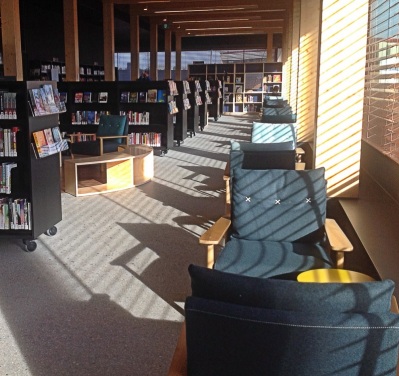
From the City of Melbourne website:
Library at The Dock is a three-storey building, 55.3 metres long by 18.1 metres wide, and is made from engineered timber and reclaimed hardwood.
Read about the building’s sustainability features (PDF, 600kb).
As well as a traditional library collection, the library and community centre offers an interactive learning environment and a state-of-the-art digital collection, multi-purpose community spaces and a performance venue that holds 120 people. Connections to Docklands’ rich maritime and Aboriginal heritage is embraced and celebrated with facilities to support local historical research and educational experiences.
This is a beautifully designed library in a fantastic location with gorgeous views. From what we observed, people living and working in the precinct happily use the library and its spaces in a variety of ways. I’m surprised that this exemplary project was funded, to be honest.
The Melbourne University libraries

The first library we visited on the Melbourne University campus was the newly refurbished Giblin Eunson Library. The first port of call was the newly redesigned library and IT help desk. Whereas the old desk was a traditional design where the desk formed a barrier between the librarian and the client, with the computer facing away from the student, the new desk was an irregular shape with the person on duty standing beside the student client and working through solutions with both people looking at the computer screen.

Filed under Libraries
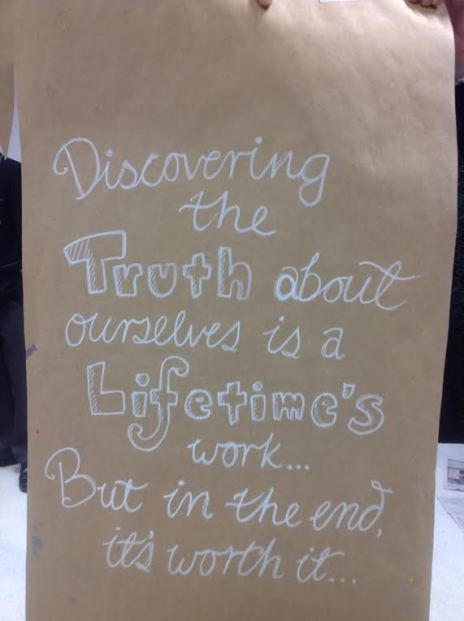
My topic today is Art as a subject in schools. I wonder if we sometimes underestimate or misunderstand the role of Art in a student’s learning. It’s so much more than making pretty pictures. Art personifies learning through a transparent process of deep exploration and problem solving – with an end product to show for it. Just as with literature, the end product can be unpacked to reveal the influences which were part of the creative process. Fortunately this is not a purely scientific process but one which invites the exploration and interpretation of the viewer. Art is a model for problem solving in other areas of learning. We should hold onto Art, and not be fooled into thinking that it is less valuable than subjects which are associated with occupational success. We need Art.
I visited a year 9 class today to see the students happily working on large representations of themselves based on their exploration of the unit ‘Home and Place’. My part in this project was the collaboration with Mihaela Brysha, Head of Art, in resourcing the project in our library website (Libguides). I’m including the project brief:
This unit explores ideas about belonging and is designed to question our relationship and interaction with:
The aim of the exploration is to make and visually interpret personal statements about what home and place means to you and how it shapes personal and cultural identity.
Australian artists Patricia Piccinini, Fiona Hall, Gordon Bennett, and Howard Arkley address some of these ideas from very different perspectives, influences, art forms, aesthetics, materials and techniques. The study of their ideas and studio art practice as well as interpretation and analysis of their artwork aims to provide stimuli for the exploration of ideas, content and techniques for practical explorations.
The online resources were a starting point for further research into these artists:
Fiona Hall; Gordon Bennett; Howard Arkley; Patricia Piccinini
The art of Gordon Bennett strikes a chord with many of our students whose families come from different countries. Bennett’s art depicts the cultural tension between his ties to his Indigenous roots and his association with Western culture.
I loved the size of these art works, their bold colours and strokes, delicate details, diverse imagery and visual storytelling. I loved the energy and focused activity in the classroom, the productive interaction between students and teacher. I took photos.
I’m looking forward to the hanging of these in the art show. Well done, boys, and well done, Mihaela.
Filed under art

La lectura es el viaje de los q no pueden tomar el tren
I’m writing an article about marketing the school library for the publication FYI.
Marketing. I used to think that it had nothing to do with education. Marketing school libraries? Bad taste. Things of value should stand on their own merits.
But here we are living in libraries within schools – part of the school, not quite part of the school. I have to admit that much of what I do is a form of marketing – the benign kind, the sincere kind, but marketing nonetheless. No, we are not selling our souls but we do need to reach out and make connections with the teachers who have charge of the students. We need them all so that we can make a difference.
Still, I have many questions about this marketing thing. I would love to have a full-on discussion with other teacher librarians about this, and with teachers, to see what they think. To see what you think.
So I’m going to offer a few of my thoughts in the hope that you will leave a comment. What do you think about this as a teacher librarian, as a teacher? The following is selected from my article:
Library promotion and the forging of relationships with staff is what we do every day.I don’t claim to be an expert and there is no ‘one size fits all’, but what I’d like to do is share my personal experience and my story.
Marketing your school library is not optional, as far as I’m concerned.
Why?
Marketing the library is a most important job, not only to make the library visible but also to make it shine, to show its vibrancy, so that teachers and students will take a break from their relentless busyness and take notice; so that they will want to come in to see what’s going on.
Sadly, libraries are sometimes invisible – despite bright and shiny new furniture, despite the brilliant displays, despite the extensive collections, despite the well meaning efforts of librarians. What I mean by that is that the library and library staff are not an intrinsic part of the essential teaching and learning activity of our schools – they don’t show up on teachers’ or students’ radar – unless we make them so. And we have to keep making them so on a daily basis.
The library used to be THE PLACE people came for information but it’s simply not the case any more. Surely you’ve noticed how often student assignments are set and completed without anyone stepping into the library. We all know how indispensable we can be and should be when research assignments are created so we need to educate students and teachers that we have the experience to support them in navigating the flood of information they now have at their fingertips. We all know our area of expertise: we can show them how to find what they need when it seems like finding a needle in a haystack – how to locate, evaluate, sort through and select, organise, interact with and synthesize information so they can create what is required. But often teachers and students will have no idea that they are playing in a sinkhole when they trust Google to find what they need. There is no doubt that we need to seriously promote ourselves as playing an essential part in everyday teaching and learning.
How?
Granted, that is easier said than done. There is no ‘one size fits all’ solution. I would say, trust your instincts. create connections, nurture authentic and meaningful relationships with teachers, faculty heads, leading teachers, assistant principals and principals.
Be yourself, be real. Don’t put on your teacher librarian persona and go out door knocking like a missionary. There is no script. You will know what to say.
Be patient. It won’t happen overnight. It might not happen the way you envisage but something will happen. Connect with other teacher librarians, blog and tweet about it, and share your experiences, reflections, evaluations. Be honest, be deep. It’s not all about what can be seen from the outside, it’s also about creating cultural shifts, shifts in understanding. All of this takes time. Look for and celebrate small successes.
Be awesome, surprising, and indispensable. Find and share what teachers want and need, but also make it amazing and wrap it up in gorgeous colours with metres of ribbon and exotic feathers.
Think about the library as a space; it’s prime real estate. The library can be a Wunderkammer, and when people come in, they should feel happy and intrigued, and wish they could stay a while. It should be a refuge for teachers from their relentless running from class to class. And you should become indispensable because you have offered to create something they have little time to do.
Where?
Everywhere – in library spaces, in classrooms, during chats in the corridor or quick catch-ups after a staff meeting, during sports days, music days, and PD days.
Don’t forget the power of promotion online – to your staff, students and school community but also to those outside the school walls. Let’s promote ourselves and what we do in our schools to the outside world, creating a reputation for being awesome, inspiring others, and being inspired by them.
It’s essential that we are seen in places other than the library. Let’s unleash ourselves from that ancient library institution – the desk. If we are stamping books and dealing with delinquent photocopiers for too much of our time, let’s think about what we can do to change that.
How to develop good relationships with teachers
My personal approach is working from the ground up with individual teachers I feel are responsive to collaboration and to my crazy ideas. I recommend you spend a lot of time in that relationship, trying to make solid, deep things happen, and that you blog the whole process with photos and repost everywhere. This way one documented collaborative project can be used as an example for many more such projects. The blog post will capture examples, reflection and evaluation, for teachers who want to see how the project worked, as well as evidence of good things happening.
Integrate, integrate, integrate
Become integrated with classes and the curriculum. Avoid feeling happy enough with isolated ‘library program’ -type lessons. As long as teachers view what we do as library programs, they will view what we do as separate, and not take it seriously. This goes for students too. We need to be there throughout the whole project, either in the classroom or through our interaction with teachers.
Should we speak up about what we’re doing and how we can help teachers in staff meetings? I’m in two minds about this. Staff meetings are usually after school and staff are tired and want to go home. On the occasion that I did stand up and promote what teacher librarians could do to support staff and students, I tried to be as entertaining as possible, and hoped that laughter would keep them focused. I would be reluctant to do that too often so that staff do not start to switch off. In my opinion, working on deeper relationships with individual teachers is more effective.
So these selections are a small part of the article which will soon be published in FYI. The article includes a lot more practical examples which I hope will be useful to other teacher librarians.
It would be so good to hear from you all. I open to changing my mind about approaches. Leave me a comment, okay?
But seriously, can we afford not to be marketing our libraries?
Filed under Libraries, Teacher librarians, Uncategorized




 Brave new world
